AI Image Generator on Azure
Analog Diffusion and infrastructure as code
From a web application to a model deployed in the cloud: architecture, automation and the constraints of image generation without a GPU.
Project contributors (alphabetical order)
TL;DR
In May 2023, a prototype web application for generating images from text descriptions using Analog Diffusion was developed as a SAN AI project. The work covered the user interface, the model API, the definition of Microsoft Azure infrastructure and the automation of selected application setup and deployment stages. Terraform, Docker and Azure DevOps were used to connect the solution’s components, from the browser form to inference in the cloud. The lack of GPU access on the student account required CPU inference, and generating 512×512 images for more than five minutes exposed a problem with maintaining the HTTP connection. After reducing the resolution to 256×256, a working flow was achieved: entering a prompt, generating an image and displaying the result on the page.
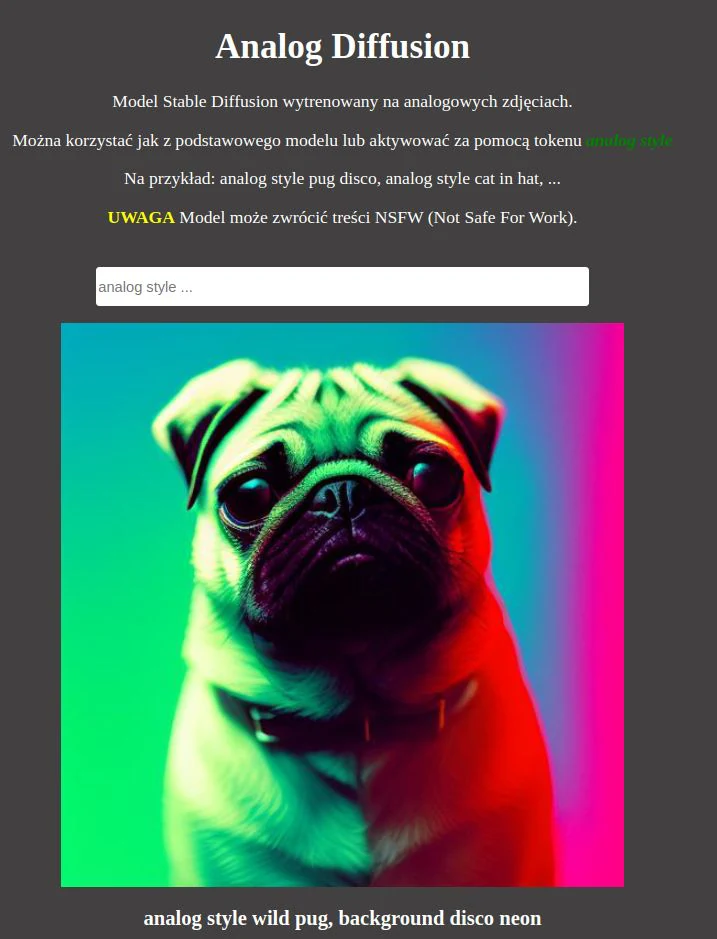
Figure 1. The prototype AI image generator interface with an example result. The screenshot illustrates the application’s appearance.
Goal: an AI application from concept to deployment
The project aimed to cover the complete process of building a generative AI application: implementing the interface and backend, defining the infrastructure and running the solution in the cloud. The starting point was a simple scenario: a user enters a prompt describing the desired image and receives the result in a browser.
Rather than training a model from scratch, the existing Analog Diffusion model from Hugging Face was used. The work focused on model integration, communication between services and preparation of the deployment environment. The project therefore combined machine learning with practical software engineering.
Technologies and their roles
| Technology | Role in the project |
|---|---|
| Node.js, Express and Pug | Web application: the form, prompt handling and image display |
| Python, FastAPI and Uvicorn | API for receiving generation requests and returning results |
| PyTorch and Hugging Face Diffusers | Model execution and inference, meaning image generation |
| Analog Diffusion | A text-to-image model based on Stable Diffusion 1.5 |
| Terraform | Definition of Azure infrastructure using Infrastructure as Code (IaC) |
| Docker | Packaging the web application as a container image |
| Azure DevOps and Azure Container Registry | Automated image builds and storage of image versions |
| Azure App Service | Running the web application container |
| Virtual Machine Scale Sets and Load Balancer | Machines hosting the model and traffic distribution |
| Azure Files | A shared directory containing the model files |
| Ansible and startup scripts | System environment preparation |
Analog Diffusion: generating an image from text
Analog Diffusion is based on Stable Diffusion 1.5 and was fine-tuned on analogue photographs using DreamBooth. The project used the model released by its author; the application and environment needed to run it were developed as part of the project.
Including analog style in a prompt enabled the model’s characteristic aesthetic. Instructions and example prompts were placed directly above the form. Details of the model’s origin are available in the Analog Diffusion model card on Hugging Face — opens in a new tab
.
Application architecture on Microsoft Azure
The web application was separated from the inference service. The frontend ran as a container in Azure App Service, while the model backend was designed to run on Virtual Machine Scale Set instances accessed through Azure Load Balancer. Model files were made available through Azure Files.
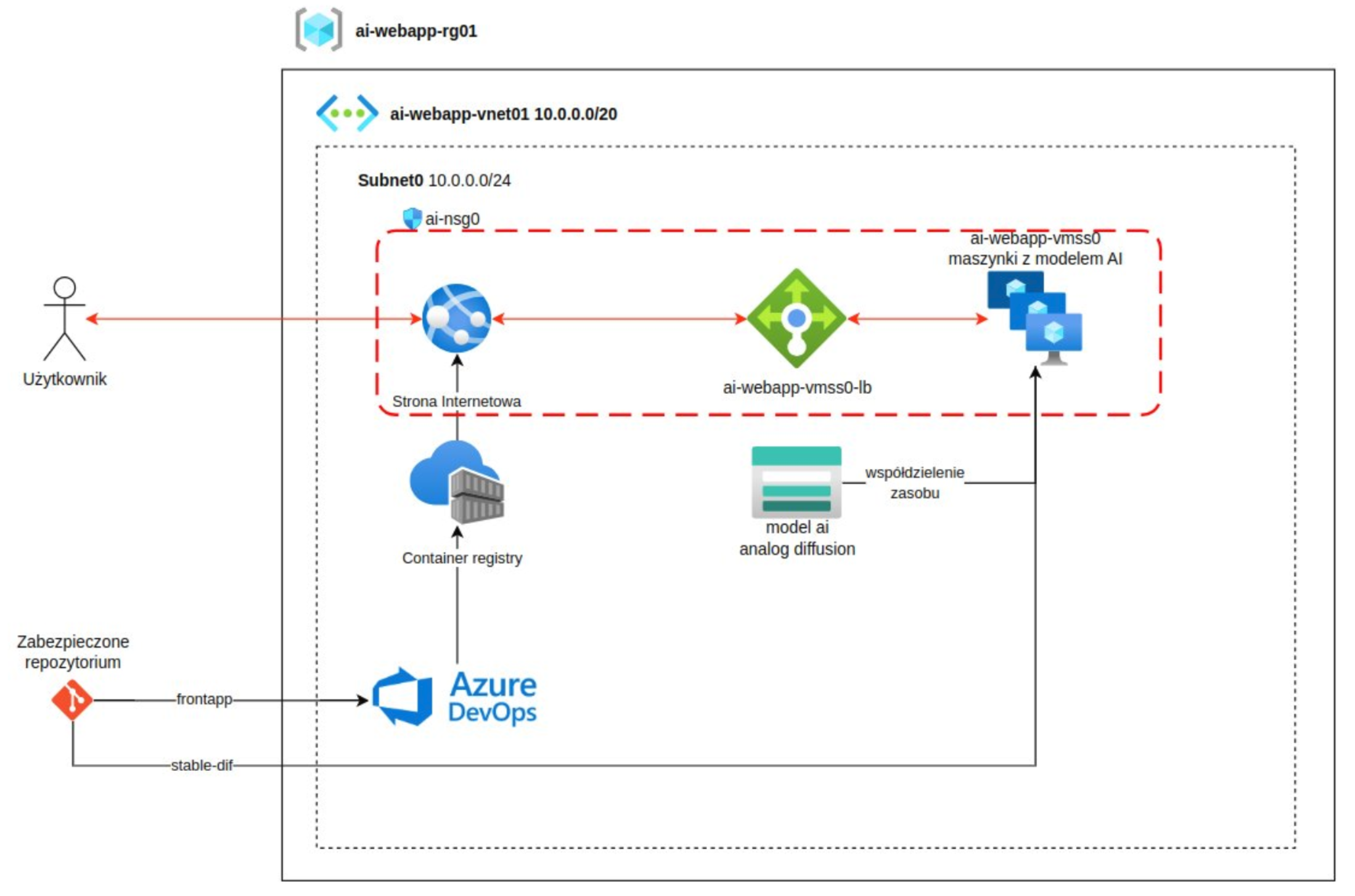
Figure 2. Architecture diagram: the web application, model service and container delivery pipeline.
Open the full-size architecture diagram

From the form to the generated image
The request flow consisted of five steps:
- Entering a prompt in the Express/Pug application form.
- Sending the description to the FastAPI endpoint
POST /generate-image. - Running the model through Diffusers using
EulerDiscreteScheduler. - Saving the result as a JPEG and transmitting the Base64-encoded image.
- Displaying the image and its prompt on the page.
A loading indicator was displayed during generation. The backend address was set through LB_ENDPOINT, while PATH_MODEL specified the model location, allowing configuration changes without editing the application code.
Terraform and deployment automation
The infrastructure was defined in Terraform in the Azure northeurope region. The configuration included a resource group, virtual network, subnet, NSG rules and a load balancer directing traffic to the API on port 8000. A Linux App Service on the Basic B1 plan was configured for the frontend, with HTTPS and always_on enabled.
The backend used Standard_D2s_v3 machines running Ubuntu 22.04 LTS. A startup script installed dependencies, including the CPU version of PyTorch, mounted the Azure Files share, retrieved the code and started Uvicorn. The model was loaded from the share into the inference process’s memory.
The IaC definition organised resources and their dependencies but did not cover the entire environment from scratch: the container registry and file share were referenced as existing services.
Repeatable application builds
The frontend was packaged as a Docker image. An Azure DevOps pipeline automated building and publishing the image to Azure Container Registry, while App Service referenced a specific image tag. This automated image building and delivery; the preserved pipeline does not include a separate step for updating the application in App Service.
An Ansible playbook was also developed to prepare an environment with Docker. Together with Terraform and startup scripts, this reduced manual steps and made individual parts of the solution easier to reproduce.
Autoscaling and inference performance
Azure Monitor was configured to scale between 1 and 5 instances: increasing the number of machines when average CPU usage exceeded 25% and decreasing it when usage fell below 10%.
Autoscaling was introduced primarily as a practical exercise to understand the relationship between load metrics, scaling rules and the number of running instances. The project provided an opportunity to examine how infrastructure can respond to changing resource demand. Understanding this mechanism forms a foundation for designing real deployments, where service availability and operating costs need to be matched to traffic levels.
Another important distinction was between throughput and the processing time of a single task. Additional machines allow independent requests to be distributed, but do not automatically speed up the generation of one image. In this solution, autoscaling therefore served to explore horizontal scaling, while long inference times required a separate approach.
CPU image generation: the response time problem
The student Azure account used for the project did not provide access to suitable GPU resources. The model therefore ran on the CPU, using system RAM rather than VRAM. Under these conditions, generating a 512×512 image took more than five minutes.
The application waited for the result within a single HTTP request. The connection in the deployment environment was terminated before the response reached the browser. A missing image on the page therefore did not necessarily indicate a model error: the problem also involved how long communication could be maintained. The approximately five-minute threshold was an observation from this deployment, rather than a universal Azure limit.
Diagnosis without running the model every time
Auxiliary endpoints were prepared to return an existing image: one without generation and another after a 60-second delay. This separated result transmission tests from expensive computation and enabled incremental checks of application behaviour during longer waits.
The one-minute delay did not reproduce the full five-minute request problem. It did, however, allow one factor — response time — to be controlled without the variability introduced by inference.
Prototype solution: 256×256 resolution
The image resolution was reduced to 256×256. The preserved code also uses 20 inference steps instead of the initial 50:
batch = pipeline(
    prompt=prompt.prompt,
    height=256,
    width=256,
    num_inference_steps=20,
)
After the change, the response reached the browser. The smaller image contained four times fewer pixels, at the cost of detail.
Results and lessons learned
A working, deployed prototype AI image generator on Azure was achieved, covering the web application, model API, infrastructure definition and automation of selected deployment stages. The flow from a text description to an image displayed on the page was completed, and hardware constraints were addressed through a deliberate resolution trade-off.
The project was educational. Further work would include handling concurrent requests without overwriting the shared image.jpg file and aligning the configured /health check with the frontend implementation.
The main direction for further development would be decoupling generation from the HTTP connection: accepting a task quickly, returning its identifier and retrieving the result after computation finishes. A task queue and a separate worker process are proposed extensions, not components of the implemented prototype.
The experience demonstrated the relationship between an AI model, computing resources and application architecture. Running inference was one stage; delivering the result to the user required the whole system to work together.