AI Album: family photographs in a digital archive
Face recognition and photo colourisation with AI
From a scanned family photograph to an album where relatives can be found, notes on the backs of prints preserved, and colour versions of archival images created.
Project contributors (alphabetical order)
TL;DR
In September 2024, AI Album was developed within SAN AI as an application for building a digital archive of family photographs. Each photograph can retain its front, reverse side, description and tags, preserving the context recorded on the original print. Face detection and person labelling were integrated so that labelled photographs provide reference examples for recognising relatives in subsequent images. A separate DDColor model produces colour versions of black-and-white photographs while preserving the originals. The result is a prototype combining photo cataloguing, information about people and AI colourisation in a single web application.
 Open the full-size image
The goal: preserving photographs and their stories
A family album contains more than images. The back of a print often carries names, a date, a location or a short dedication. Scanning only the front preserves the photograph but can separate it from the information needed to reconstruct a family’s history.
AI Album was conceived as an attempt to combine the digitisation of family photographs with their organisation and description. The aim was to build an application covering the full workflow: adding a digital copy, preserving both sides of a print, labelling people, reusing those labels and optionally colourising the image.
Existing face recognition tools and a colourisation model were used. The project’s contribution was to integrate these components with an album interface and a data model suited to family photographs.
From a paper print to a digital album
Each photograph supports a front image and an optional reverse image. The first holds the photograph itself; the second preserves handwritten notes and other information on the back. Descriptions and tags add context that does not have to be read from the image each time.
The workflow consists of:
- Adding a scan or digital photograph of a print.
- Providing a description, tags and, where available, the reverse side.
- Detecting faces and assigning them to known people.
- Saving information that can help recognise people in subsequent photographs.
- Optionally creating a colour version.
The application accepts existing scans or digital photographs of prints. The quality of these copies affects image legibility and recognition performance. The reverse is stored as an additional image; the information written on it can also be included in the photograph’s description.
Face recognition and person labelling
Detecting a face does not yet mean recognising a person
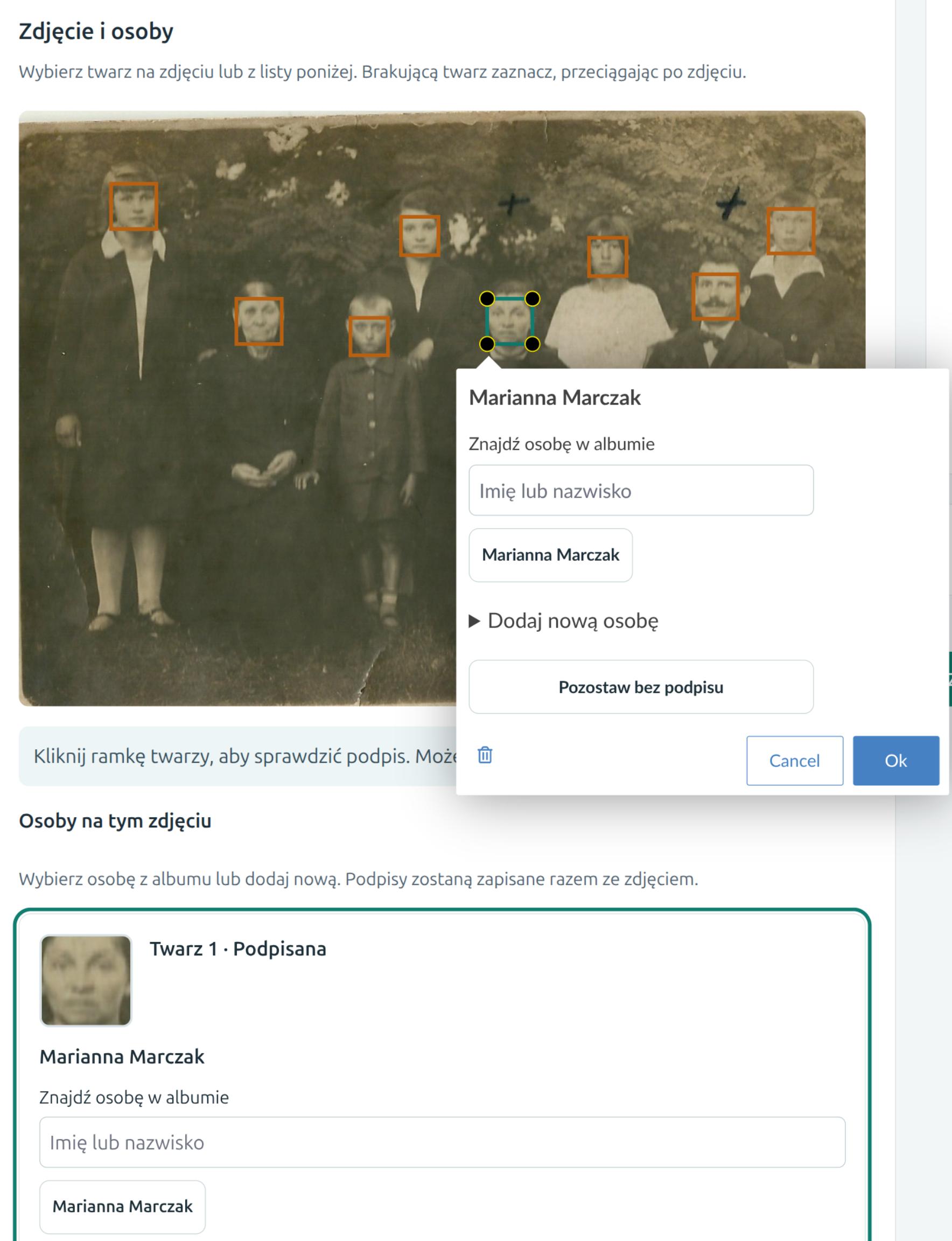
After a photograph is uploaded, the detection mechanism locates faces. Only the next stage determines whether a face matches someone already recorded in the album. This distinction matters: a face can be detected without knowing the name of the person it belongs to.
The interface uses Annotorious to work with image annotations. A detected face can be assigned to an existing person or labelled as someone new. The database stores links between the photograph, person, annotation coordinates and face crop.
 Open the full-size image
How the application “learns” to recognise relatives
The face_recognition library, built on dlib, was used for analysis. The mechanism compares numerical representations of faces, known as embeddings, with representations generated from previously labelled examples.
Each face is described by a vector of 128 numbers, produced by a pretrained neural network. This is not a list of explicit attributes such as eye colour, but a representation that allows facial similarity to be compared. The comparison therefore goes beyond checking whether two face crops contain identical pixels.
The library calculates the distance between representations and compares it with a matching threshold. In AI Album, the compare_faces function uses the default tolerance of 0.6. This does not mean 60% recognition confidence: it is a distance threshold, and lowering it makes matching stricter. The choice of threshold affects the trade-off between missing valid matches and assigning a face to the wrong person.
What might informally be called “fine-tuning” is, in this project, updating the database of face representations assigned to people, rather than retraining the neural network’s weights. The model that converts a face into a representation remains a pretrained component. It is the collection of reference examples used to compare subsequent photographs that grows.
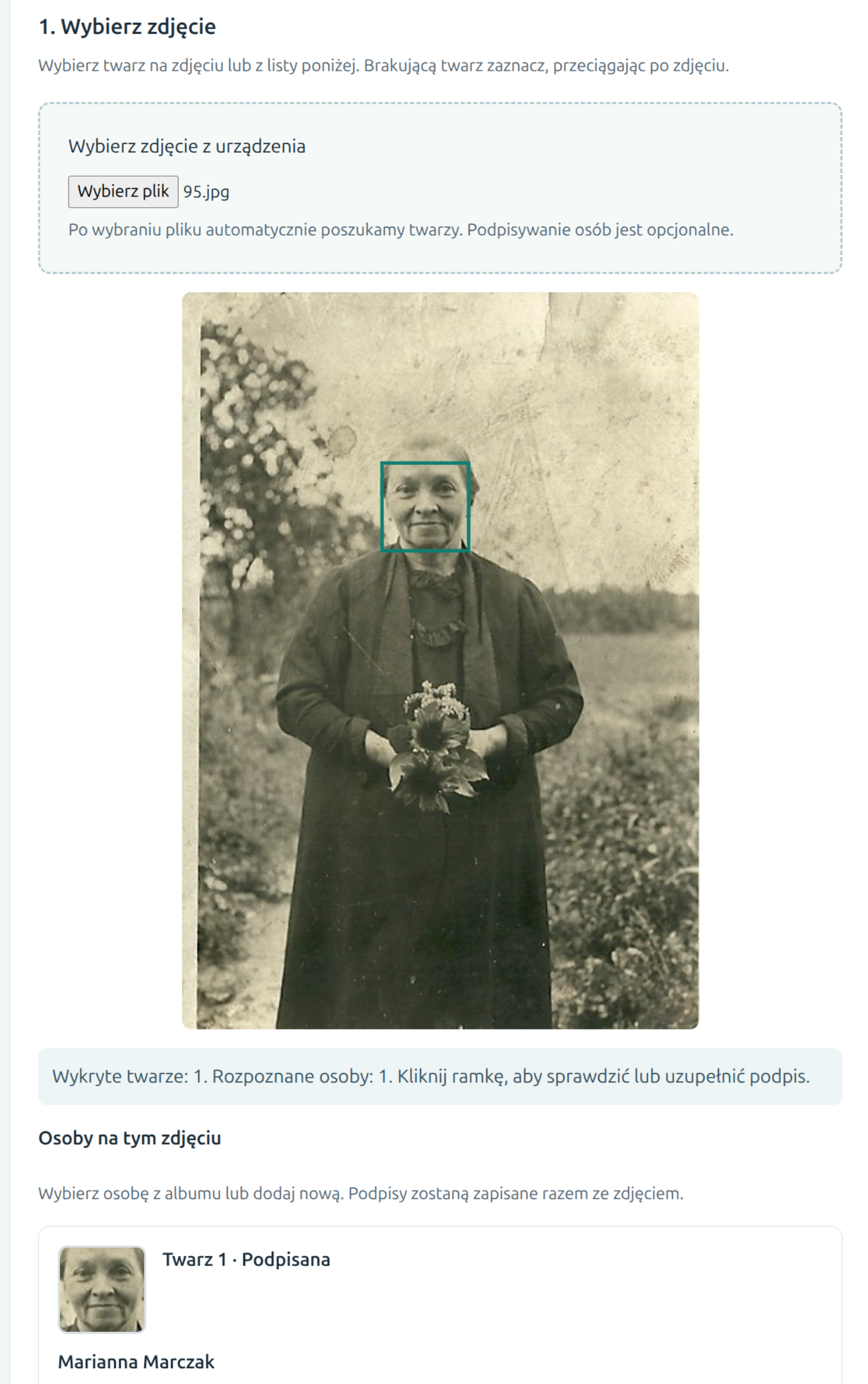
The implementation uses HOG detection to locate faces, while their representations are calculated in a separate stage. After a new face is compared with the database, matching examples are counted for each person, and the person with the highest number of matches is selected. This allows the application to suggest a person in subsequent photographs without requiring their details to be entered again each time. Labels can be corrected later.
The representation process and the meaning of tolerance are described in the face_recognition documentation — opens in a new tab .
This does not mean that names are automatically assigned throughout the entire archive in one step. Recognition runs as part of the photo upload workflow; its result depends on the available labelled examples and the quality of the new photograph.
 Open the full-size image
The screenshots show two distinct stages: labelling faces in a group photograph and receiving a person suggestion when adding another portrait. This illustrates the application’s behaviour rather than measuring recognition accuracy across the entire dataset.
Colourising archival photographs with DDColor
The second application of AI is producing colour versions of black-and-white photographs. DDColor, a model designed for image colourisation, was integrated for this purpose. It is separate from face recognition: its role is to generate a proposed colour palette, rather than identify people.
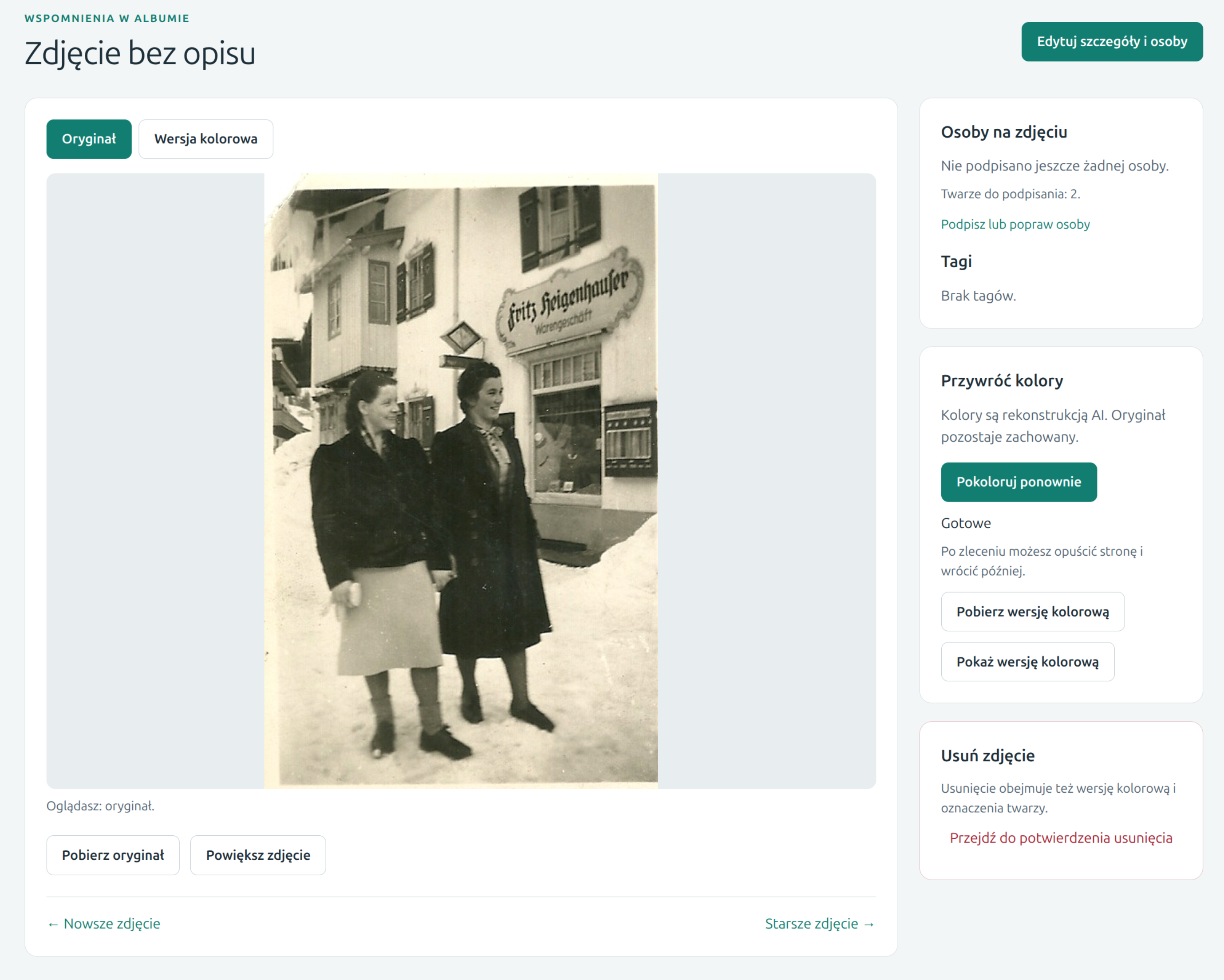
The original is preserved, and the result is saved as an additional version of the photograph. This allows the source photograph to be compared with the processed version and keeps the archival material accessible.
AI colourisation is an interpretation, not confirmation of historical colours. A black-and-white photograph does not uniquely determine the colour of clothing or objects. The result may make a photograph more approachable, but it should neither replace the original nor be presented as evidence of its subjects’ actual appearance.
How DDColor works
DDColor separates lightness information from colour information. In the CIELAB colour space, the L channel describes lightness, while the a and b channels carry colour components. The model predicts the missing colour channels and combines them with the source image’s lightness. This is not a uniform filter: the colours depend on the photograph’s content.
The name refers to two decoders. First, an encoder extracts image features at different levels of detail. The pixel decoder reconstructs the spatial arrangement of these features, while the colour decoder uses a transformer mechanism to match learned colour representations, known as colour queries, to the scene’s context. Cross-attention connects them with image features, helping to reduce colour bleeding across object boundaries.
In practice, the model therefore draws on both local details and the wider context. This helps produce a coherent colour palette, but it cannot establish the actual colour of a particular dress or building façade. A result may look convincing while representing just one possible interpretation of the photograph. AI Album uses pretrained model weights, without training DDColor on the family photo collection.
The architecture is described in DDColor: Towards Photo-Realistic Image Colorization via Dual Decoders — opens in a new tab , presented at ICCV 2023.
Colourisation examples: original and result
The first comparison shows a photograph of two people in front of a building. Switching versions in the application allows the preserved source image to be compared with the model’s proposed colours.
Original
 Open the full-size original
AI colourisation
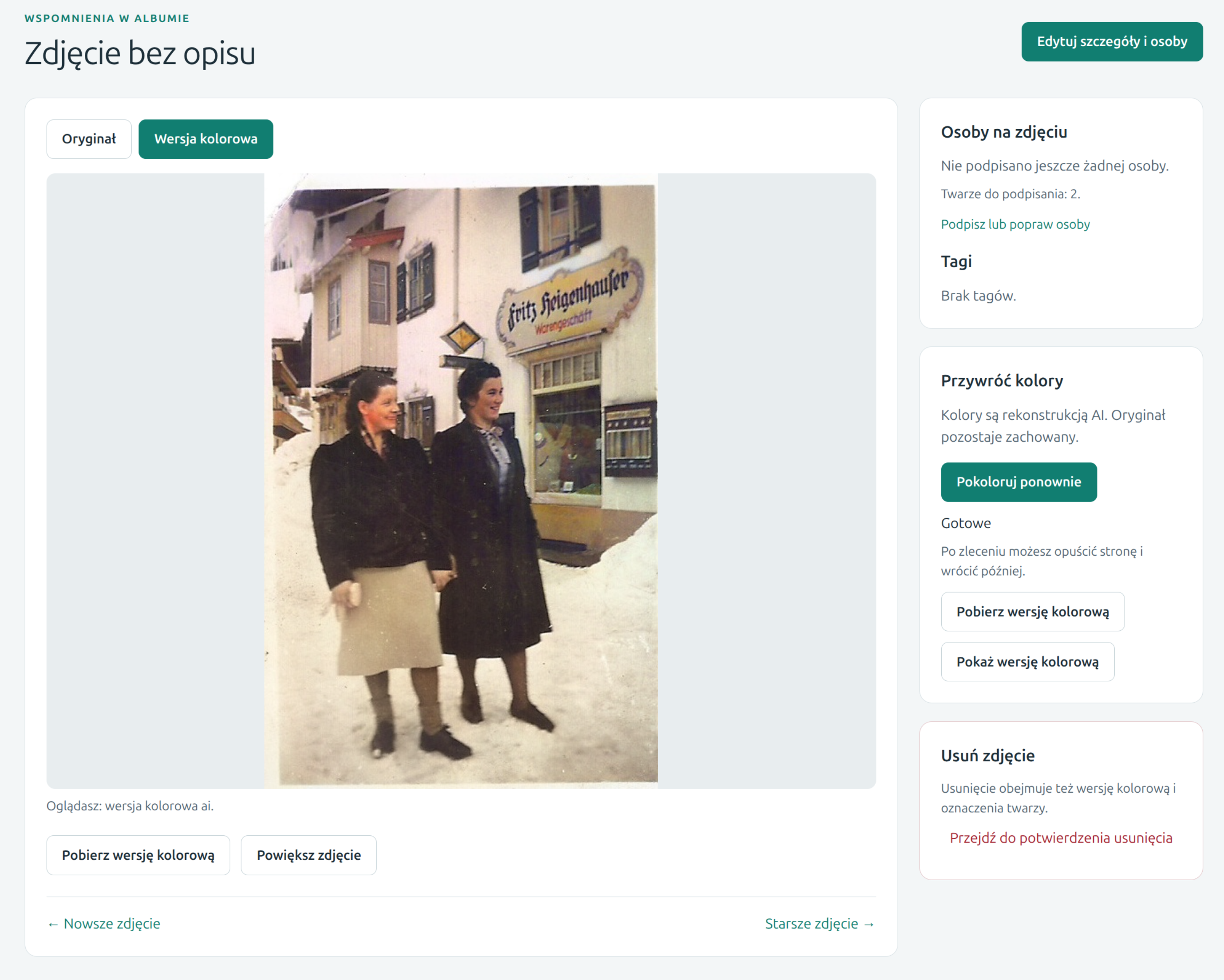 Open the full-size result
The second example shows a different group photograph. In both cases, the result remains a separate version of the image; the original is still available to view and download.
Original
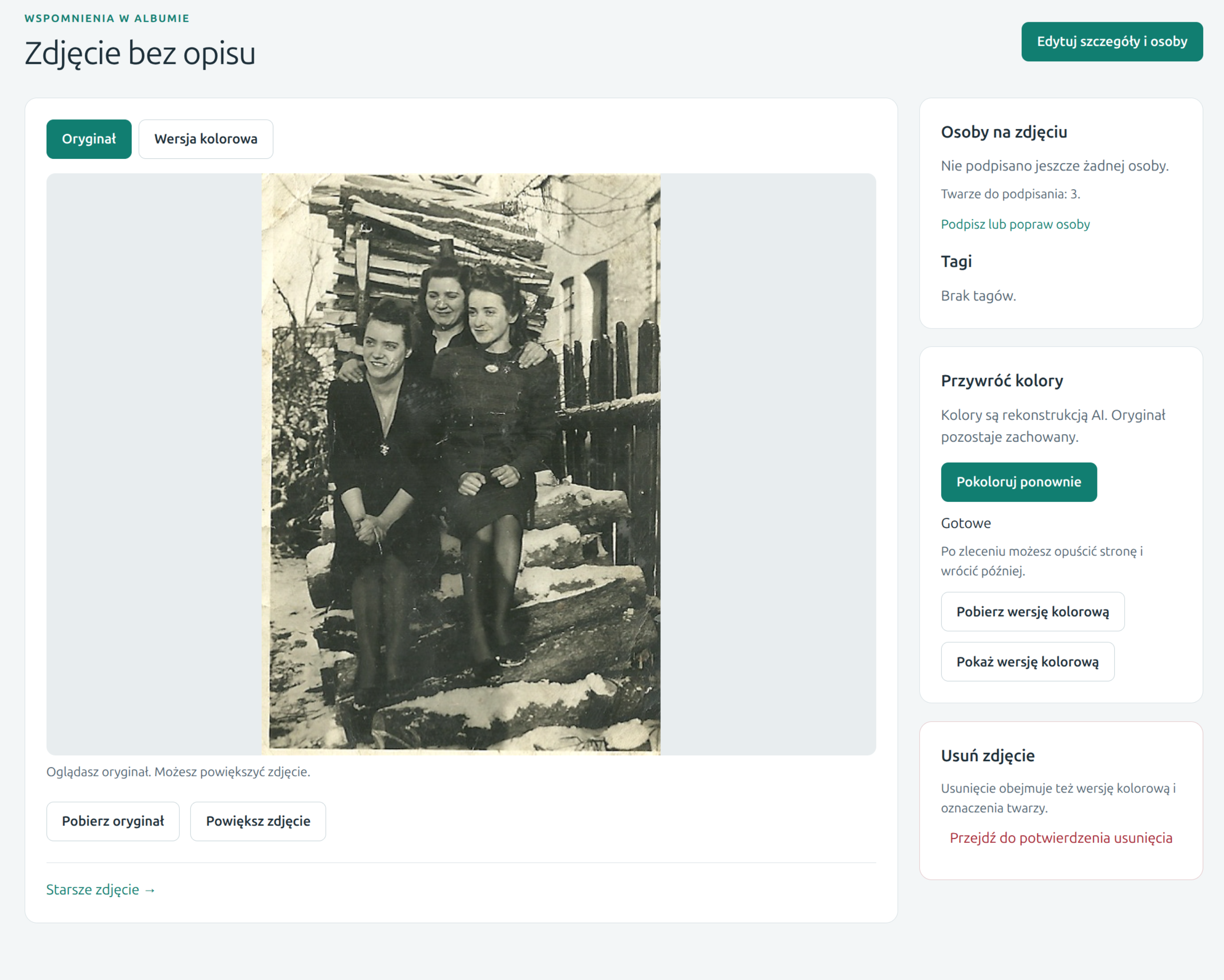 Open the full-size original
AI colourisation
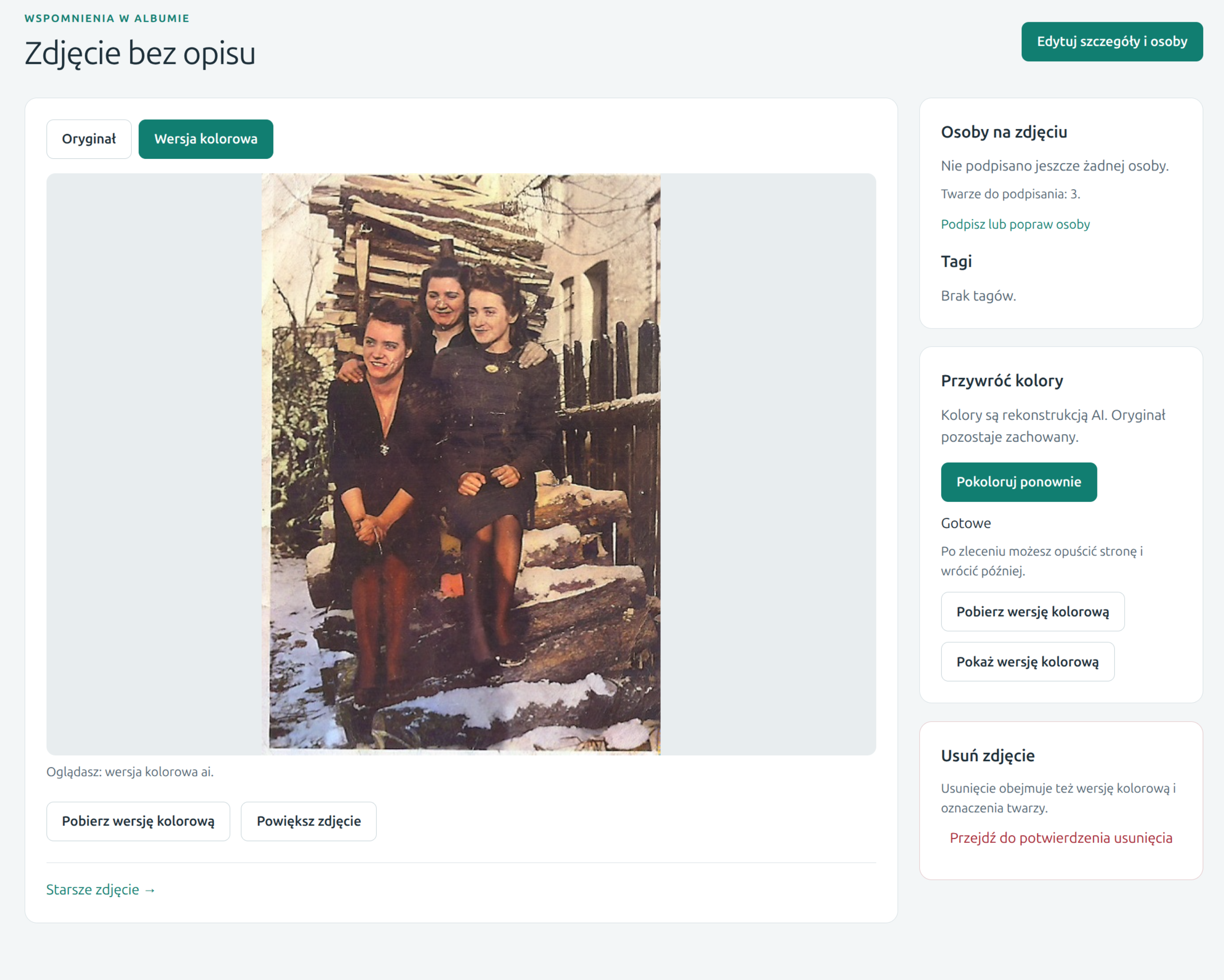 Open the full-size result
For details of the method, see the official DDColor repository — opens in a new tab . The project uses pretrained DDColor weights available on Hugging Face — opens in a new tab .
Technologies and application architecture
| Technology | Purpose |
|---|---|
| Python and Django | Album logic, forms, views and data handling |
| PostgreSQL | Photographs, descriptions, tags, people and annotation relationships |
| face_recognition and dlib | Face detection, representations and comparison of examples |
| Annotorious and JavaScript | Labelling people directly on photographs |
| Tailwind CSS | Web application interface |
| DDColor | Colourisation of black-and-white photographs |
| FastAPI and ModelScope | A separate service providing colourisation |
| Docker and Docker Compose | Preparing and running the application environment |
The album layer was built with Django and a PostgreSQL database. In the implemented data model, images and face crops are stored in binary fields, while relationships connect photographs with tags and labelled people. This structure treats a photograph as a record with context rather than an isolated file in a directory.
Separating colourisation from waiting in the browser
In the current version, a colourisation request creates a task, and a separate worker sends the photograph to the DDColor service. The interface checks the task’s status and makes the result available once processing is complete. The page does not need to remain open throughout processing.
The model runs in a separate FastAPI service, while the application saves the colour version and information about the model used. Docker Compose brings together the application, database, worker and colourisation service.
From a collection of files to finding memories
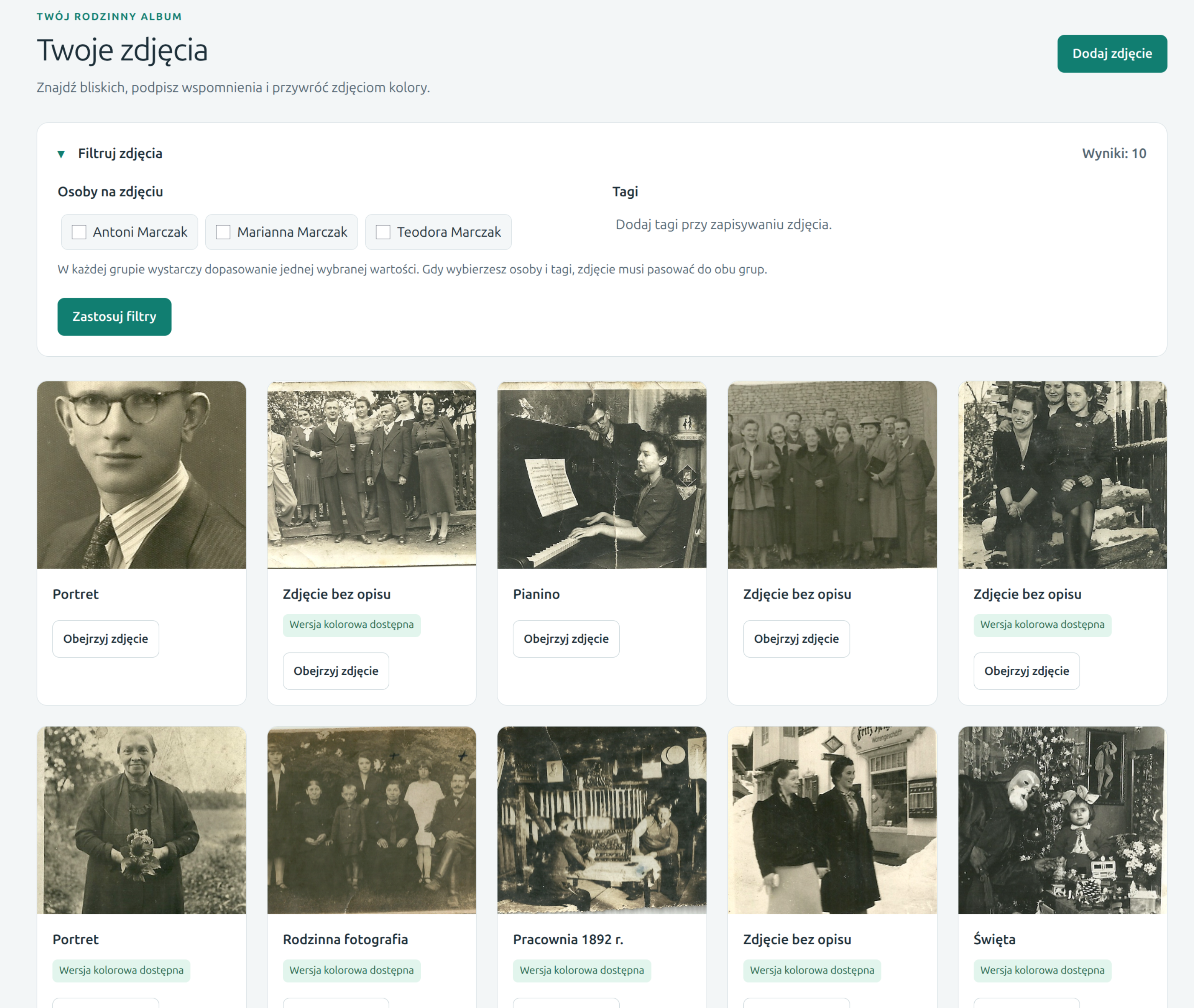
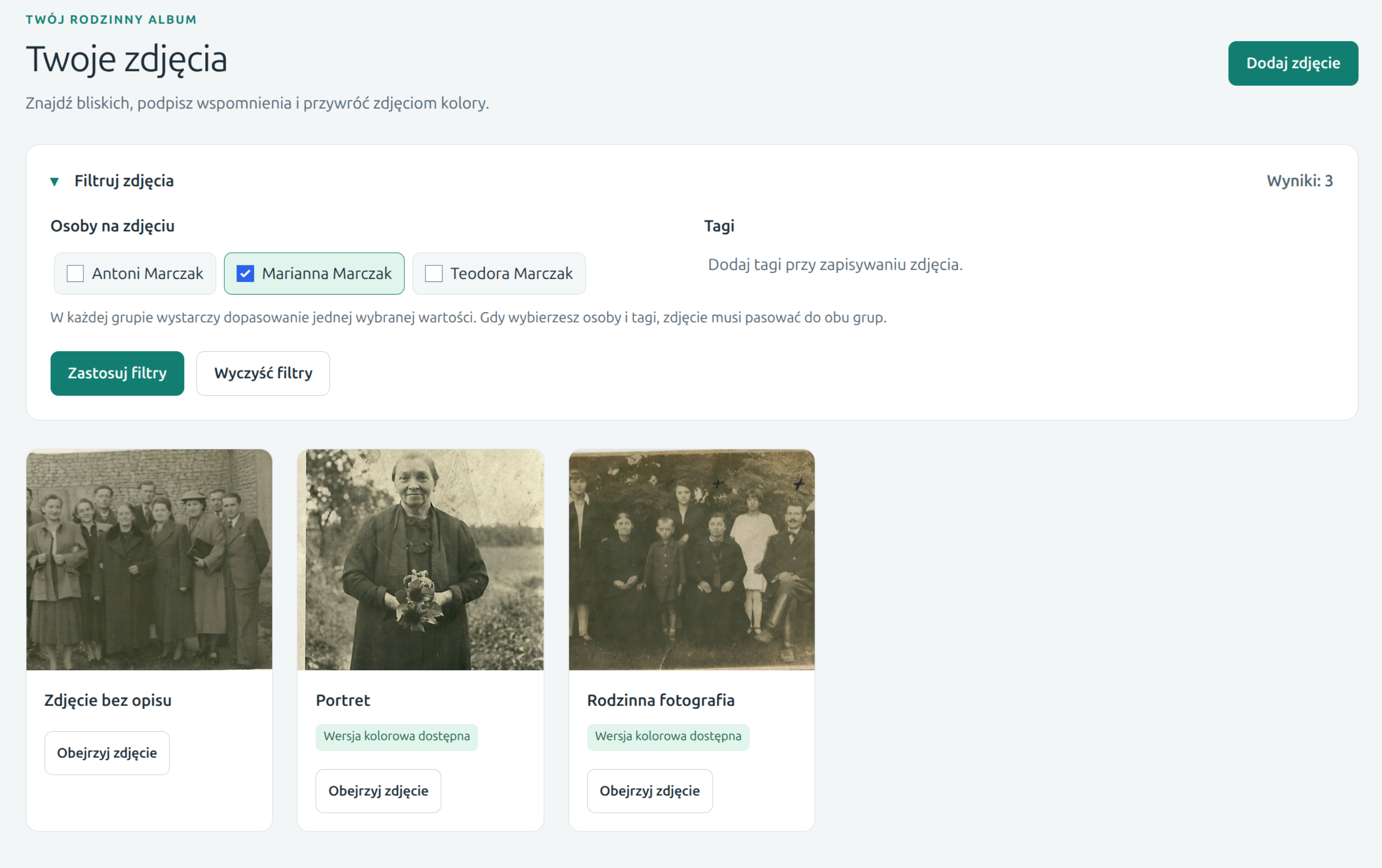
Person labels and tags make photographs searchable by their content. Instead of browsing every file, a person can be selected to retrieve photographs carrying their saved label. The implemented version includes person and tag filters, a photo detail view, and switching between the original, reverse side and colour version.
The project’s value lies in combining these functions: recognition helps populate the album, but it is the structured data that makes the photographs easier to find later.
 Open the full-size image
Result and limitations
A prototype was developed combining family photo digitisation, face recognition and AI colourisation. The front, reverse side and information about people provide a shared context for each photograph, while two independent AI mechanisms support its description and the creation of an additional image version.
The project does not report measurements of person recognition accuracy. Low resolution, damage to a print, face orientation and large age differences can make matching more difficult. Identification suggestions therefore require verification, and colourisation should be distinguished from reconstructing historically verified colours.
The project demonstrates how AI can support work on a family archive while retaining a role for the user’s knowledge: people understand the context, label their relatives and assess whether suggestions are correct.